SecPosture360 Technical Requirements
Clear expectations for deployment, supported platforms, and why SecPosture360 is built the way it is.
Built for professional IT environments.
SecPosture360 is intentionally designed to protect sensitive assessment and risk data, support multi-user workflows,
and scale with your organization—using proven Microsoft technologies commonly found in local government and SMB networks.
Architecture Overview
SecPosture360 uses a two-tier architecture:
- Desktop front end for data entry, analysis, and reporting
- SQL Server back end for centralized, multi-user data storage
This design supports stronger security controls around sensitive assessment information (access control, auditing,
backups, and administrative oversight), while keeping the user experience fast and practical for day-to-day work.
SecPosture360 Desktop Interface
Professional desktop workflow with a secure SQL Server data store
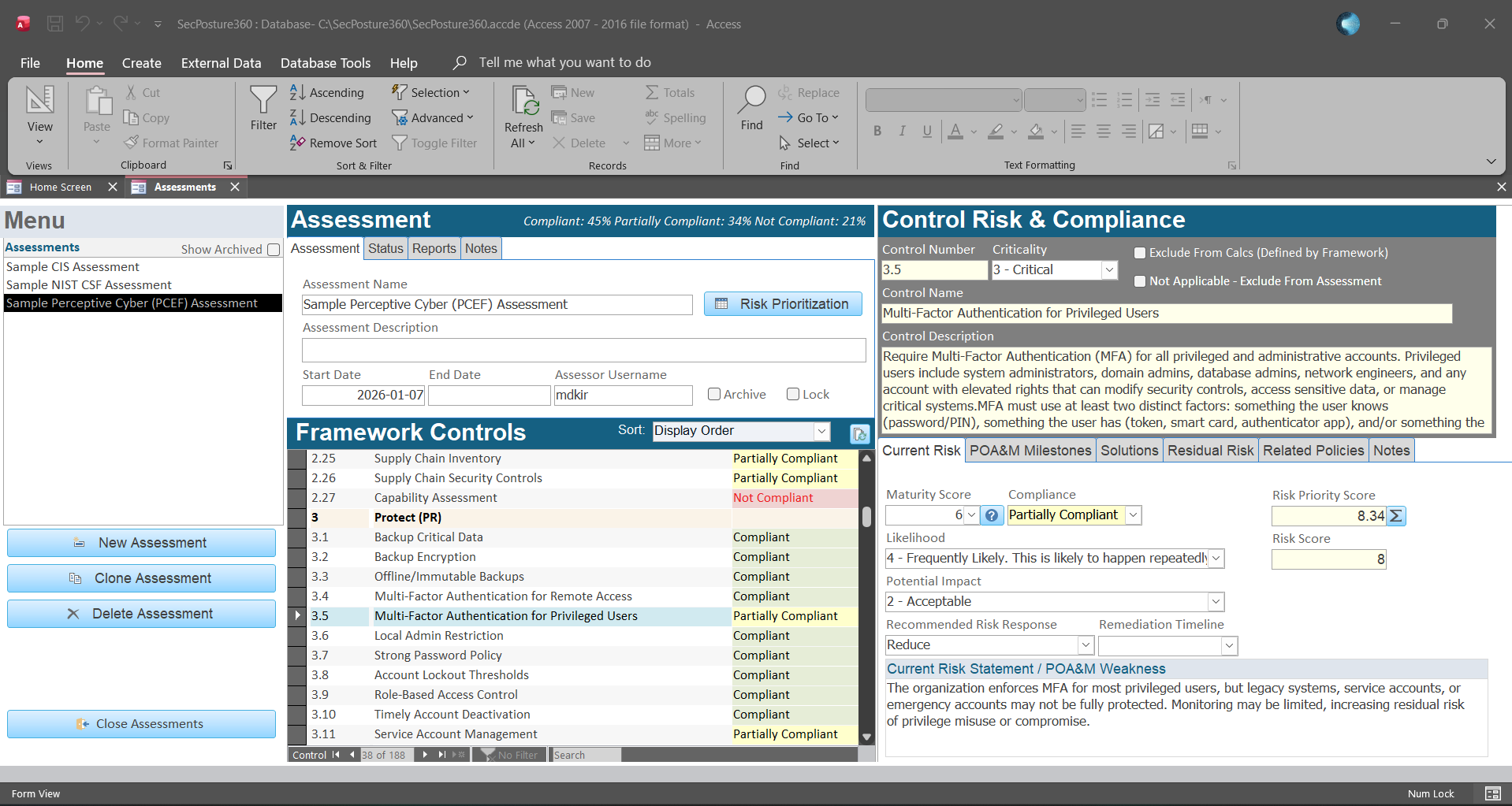
The desktop application is delivered as a compiled ACCDE and installed locally per workstation.
Data is stored centrally in SQL Server to support security, performance, and multi-user access.
Front-End Requirements
- Operating System: Windows 10 or Windows 11 (fully patched)
- Microsoft Office: Recommended (Microsoft 365 Apps or equivalent)
- Minimum: Microsoft Access (modern supported version)
- Format: Compiled ACCDE front end installed per user workstation
Note: Access-only installs will run SecPosture360, but some advanced exports and reporting features require Excel.
Database Requirements
- Platform: Microsoft SQL Server
- Minimum Version: SQL Server 2019 (or newer)
- Minimum Edition: SQL Server Express
- Strongly Recommended: SQL Server Standard
SQL Server Standard is recommended for multi-user environments, larger datasets, and long-term scalability.
Reporting & Excel
SecPosture360 includes built-in reporting for compliance, risk visibility, and prioritization.
- Some reports and exports require Microsoft Excel
- Common outputs include risk registers, POA&M tracking, and executive summaries
Why SQL Server for Sensitive Assessment Data
Cyber assessments often document institutional weaknesses, gaps, and risk decisions. SecPosture360 stores assessment data in
SQL Server to help organizations apply stronger safeguards than file-based storage alone, including:
- Centralized authentication and access control
- Administrative oversight and improved auditability
- Reliable backups, recovery options, and maintenance practices
- Better multi-user performance and scalability
Deployment Expectations
SecPosture360 is not consumer “click-and-go” software. It is designed to integrate into a professional IT environment.
Customers should have basic ability (or support) to:
- Provision a SQL Server instance (on-prem or virtualized)
- Create the database using provided scripts
- Configure authentication and permissions
- Perform routine SQL Server administration (patching, backups, monitoring)
Need help confirming fit or planning deployment? Contact Perceptive Cyber and we’ll help you map out a clean setup.